
1.5. Cashier Intent
Introduction
A Connecting Party that draws its own cashier — the screen where a player picks how to deposit or withdraw — has to know which payment methods to show before the player has chosen anything. The methods live on the Auxiliary Endpoints of a Master Endpoint, and which of them a particular player may use depends on who the player is: their wallet currency, country, KYC status and categories, as the Connecting Party Player Account Management system (PAM) knows them.
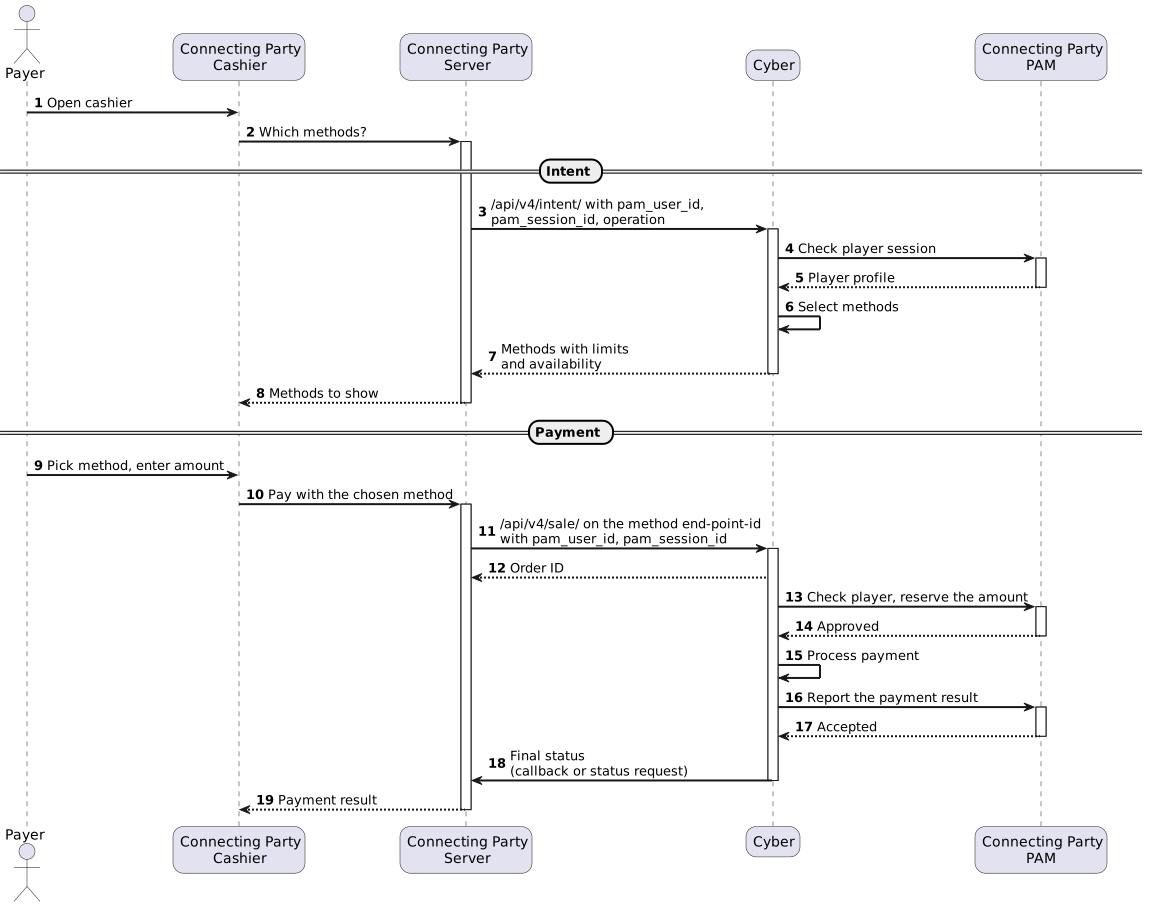
The intent call answers exactly that question. The Connecting Party server sends the player identifiers to the Master Endpoint, Cyber checks the player session with the PAM configured for that Master Endpoint and returns the list of methods for the requested direction, each with its amount limits and a flag saying whether the player may use it right now.
The call has three properties worth knowing up front.
- Nothing is created
Opening the cashier is not an order. The call creates no transaction, reserves nothing and leaves no trace in the order list, so a cashier the player opens and abandons costs nothing but the call itself.
- Nothing is cached
The player session is checked with PAM on every call. A session the Connecting Party revokes stops producing methods on the very next call, and a later payment checks the player again independently of any intent answer, see Next Step: Payment.
- Personal data stays on the server side
The answer carries only what a cashier needs to draw itself — wallet currency and balance, categories, KYC status and the methods. The player’s name, address, date of birth, phone and email are not returned and are not stored.
Note
The interaction between Cyber and PAM is not part of the Connecting Party integration and is not described here. For the cashier it is a single step inside the intent call.
What to Obtain from Cyber
MASTERENDPOINTID and MERCHANTLOGIN in the examples are placeholders. Real values are provided by Cyber on onboarding, independently for the sandbox and the production environment.
Parameter |
Description |
|---|---|
Master Endpoint ID |
Identifier of the Master Endpoint the cashier is opened on. Used in the URL of the intent call. The methods returned are its Auxiliary Endpoints. |
Merchant login |
Merchant login provided by Cyber. Sent as oauth_consumer_key when signing requests. The Master Endpoint must belong to this login. |
RSA key pair |
The private key signs the requests and never leaves the Connecting Party server. The public key is sent to the support manager and is configured on the Master Endpoint. |
PAM integration |
Enabled on the Master Endpoint by Cyber support, together with the connection to the Connecting Party PAM and the rules of each method (countries, KYC statuses, player categories). Until it is enabled the intent call is refused with error 20. |
The keys are generated with a Key-Pair-Factory tool or OpenSSL, see Generating Key Pair. The signing procedure is described in OAuth RSA-SHA256.
Cashier Flow
The diagram shows a deposit. A payout follows the same path with operation=payout.
Request
Integration |
Production |
|---|---|
https://sandbox.e-securegate.com/paynet/api/v4/intent/MASTERENDPOINTID |
https://gate.e-securegate.com/paynet/api/v4/intent/MASTERENDPOINTID |
The request is a POST with a form-encoded body, signed with OAuth 1.0a RSA-SHA256 like other v4 calls: the signature is computed over the request parameters, which is why the body is not JSON.
POST /paynet/api/v4/intent/MASTERENDPOINTID HTTP/1.1
Host: sandbox.e-securegate.com
Content-Type: application/x-www-form-urlencoded
Authorization: OAuth oauth_consumer_key="MERCHANTLOGIN",
oauth_signature_method="RSA-SHA256",
oauth_timestamp="...", oauth_nonce="...", oauth_version="1.0",
oauth_signature="..."
pam_user_id=player-1001&pam_session_id=7c1e0d52-5b1f-4f0a-9d2b-3a6c8e4f1b20&operation=deposit&amount=50.00¤cy=EUR&country=SE
Parameter |
Required |
Description |
|---|---|---|
pam_user_id |
yes |
The player as the Connecting Party PAM knows them. Up to 100 characters. |
pam_session_id |
yes |
The player session on the Connecting Party side, checked with PAM on every call. Up to 255 characters. |
operation |
yes |
deposit or payout, case-insensitive. Only Auxiliary Endpoints configured for that direction are returned. Any other value is rejected with error 1. |
amount |
no |
The amount the player intends to pay or withdraw, in the wallet currency. When omitted, methods are returned without checking their amount limits — a cashier usually opens before the player has typed an amount. |
currency |
no |
ISO 4217 code. Used only when PAM reports no wallet currency; the wallet currency reported by PAM always wins. There is no conversion: methods in another currency are not offered. |
country |
no |
ISO 3166-1 alpha-2 or alpha-3 code. Used only when PAM reports no country. An unknown code is ignored and does not narrow the list. |
locale |
no |
Preferred locale, e.g. sv_SE. Up to 16 characters. Accepted for forward compatibility; it does not affect the answer at the moment. |
Parameter names are also accepted with hyphens: pam-user-id, pam-session-id.
Warning
Send non-empty pam_user_id and pam_session_id. A missing parameter is rejected with a precise message (error 1), but an empty value may surface as an internal error (102) that is harder to diagnose.
Response
A processed request is answered with 200 and a JSON body, Content-Type: application/vnd.pay+json;charset=UTF-8, regardless of the Accept header. Fields without a value are omitted rather than sent as null.
HTTP/1.1 200 OK
Content-Type: application/vnd.pay+json;charset=UTF-8

{
  "type": "intent",
  "serial-number": "00000000-0000-0000-0000-000002d9b22a",
  "end-point-id": 221298,
  "user-currency": "EUR",
  "user-balance": 500.00,
  "user-categories": ["VIP"],
  "kyc-status": "APPROVED",
  "methods": [
    {
      "end-point-id": 221296,
      "identifier": "card",
      "name": "Card",
      "currency": "EUR",
      "flow-type": "DEPOSIT",
      "logo-url": "https://merchant.com/logos/card.svg",
      "preferred": true,
      "available": true,
      "min-amount": 1.00,
      "max-amount": 1000.00,
      "saved-instruments-only": false
    },
    {
      "end-point-id": 221299,
      "identifier": "bank-transfer",
      "name": "Bank transfer",
      "currency": "EUR",
      "flow-type": "DEPOSIT",
      "preferred": false,
      "available": false,
      "refusal": "AMOUNT_BELOW_MINIMUM",
      "min-amount": 100.00,
      "saved-instruments-only": false
    }
  ],
  "saved-methods": []
}
Field |
Description |
|---|---|
type |
Always intent. |
serial-number |
Request serial number, as on every API response. Quote it to support: it is the key the call is traced by, since the call creates no order. |
end-point-id |
The Master Endpoint the cashier was opened on. |
user-currency |
Wallet currency, ISO 4217 — the currency the cashier works in and every method is in. |
user-balance |
Wallet balance as PAM reported it. Omitted when PAM did not report one. |
user-categories |
Player categories as PAM reported them. Empty array when there are none. |
kyc-status |
KYC status as PAM reported it. Omitted when PAM did not report one. |
methods |
Methods for the requested direction, in the order configured on the Master Endpoint. May be empty, see Reading the Answer. |
saved-methods |
Instruments the player has already used. Part of the contract, always empty at the moment. |
refusal |
Why the player cannot pay now. Omitted when they can. See Refusal Codes. |
Each element of methods is one Auxiliary Endpoint.
Field |
Description |
|---|---|
end-point-id |
Auxiliary Endpoint ID — where the payment with this method is addressed to, see Next Step: Payment. |
identifier |
Method identifier as configured on the Master Endpoint, e.g. card. Stable, suitable for the cashier’s own mapping of icons and texts. |
name |
Display name as configured on the Master Endpoint. |
currency |
ISO 4217 code of the method. Always equals user-currency. |
flow-type |
DEPOSIT or PAYOUT — the direction of the money. |
logo-url |
Where to fetch the method logo. Omitted when none is configured. |
preferred |
The method the cashier should pre-select. At most one method carries true, and it is always an available one. |
available |
Whether the method’s own rules let the player use it: maintenance, amount, KYC status, categories. It does not take the top-level refusal into account. |
refusal |
Why the method is not available. Omitted when available is true. |
min-amount, max-amount |
Amount bounds of the method, both inclusive. Omitted when there is no bound at that end. A payment may still be held to narrower limits decided later (card-specific or routing limits), never to wider ones. |
fee |
Reserved. Not filled at the moment: whether a player is charged a fee depends on the routing chosen at payment time. |
saved-instruments-only |
The method works only with an instrument the player has already saved. |
Note
An unavailable method is returned with its reason instead of being dropped, so the cashier can show it greyed out and tell the player what to change — for example, the minimum amount.
Reading the Answer
There is one rule: when the answer has a top-level refusal, the player cannot pay now, whatever methods and their available flags say.
Answer |
What the cashier does |
|---|---|
No refusal |
Show the methods. The player may pay with those where available is true. |
refusal and empty methods |
The usual refusal. Do not offer a payment; explain the reason from Refusal Codes. When the list became empty during selection, refusal carries the selection reason, e.g. NO_METHOD_IN_PLAYER_CURRENCY, rather than a PAM one. |
refusal and non-empty methods |
Possible only on a Master Endpoint configured by support to open the cashier even when PAM refuses or does not answer, and only when the request carried currency. refusal is PLAYER_REFUSED_BY_PAM or PAM_UNAVAILABLE. The methods may be shown for information, but a payment must not be offered on the strength of this answer, even for a method with available: true. |
A refusal:
{
  "type": "intent",
  "serial-number": "00000000-0000-0000-0000-000002d9b22b",
  "end-point-id": 221298,
  "user-categories": [],
  "methods": [],
  "saved-methods": [],
  "refusal": "PLAYER_REFUSED_BY_PAM"
}
The same player on a Master Endpoint that opens the cashier despite the refusal. The card method is shown as available, but the top-level refusal still means the player cannot pay:
{
  "type": "intent",
  "serial-number": "00000000-0000-0000-0000-000002d9b22c",
  "end-point-id": 221298,
  "user-currency": "EUR",
  "user-categories": [],
  "methods": [
    {
      "end-point-id": 221296,
      "identifier": "card",
      "name": "Card",
      "currency": "EUR",
      "flow-type": "DEPOSIT",
      "preferred": true,
      "available": true,
      "min-amount": 1.00,
      "max-amount": 1000.00,
      "saved-instruments-only": false
    }
  ],
  "saved-methods": [],
  "refusal": "PLAYER_REFUSED_BY_PAM"
}
Note
A payment checks the player with PAM again and does not rely on any intent answer. It is declined if the refusal or the outage persists, and may go through once PAM answers normally. When the reason is PAM_UNAVAILABLE, call intent again later instead of sending a payment based on the old answer.
Method Selection
Selection runs in two stages. The first decides whether a method is offered at all, the second whether an offered method may be used.
Offered or not. Auxiliary Endpoints of the Master Endpoint are filtered in this order:
Country — the Auxiliary Endpoint serves the player country (alpha-2 and alpha-3 codes both match). An Auxiliary Endpoint with no countries configured serves every country, and a player whose country is unknown — PAM reported none and the request carried none — passes this filter.
Currency — the Auxiliary Endpoint is in the wallet currency.
Direction — the Auxiliary Endpoint is configured for sale when operation=deposit and for payout when operation=payout.
The first filter that leaves nothing names the top-level refusal: NO_METHOD_FOR_PLAYER_COUNTRY, NO_METHOD_IN_PLAYER_CURRENCY or NO_METHOD_FOR_OPERATION.
Several Auxiliary Endpoints may carry the same method identifier. Only one of them is returned: the one marked default on the Master Endpoint, otherwise the first in the configured order.
Available or not. Every offered method is then checked against its own rules, in this order, and the first rule broken is reported in its refusal:
Maintenance — the method is temporarily out of service (METHOD_UNDER_MAINTENANCE).
Amount — when amount was sent, it is within min-amount and max-amount (AMOUNT_BELOW_MINIMUM, AMOUNT_ABOVE_MAXIMUM).
KYC status — when the method is limited to certain KYC statuses, the player holds one of them (KYC_STATUS_NOT_ACCEPTED). Compared case-insensitively.
Player category — when the method is limited to certain categories, the player is in at least one of them (PLAYER_CATEGORY_NOT_ACCEPTED). Compared case-insensitively.
Note
Country fails open, the player rules fail closed. A missing country lets every method through, because refusing everyone would close the cashier over a field PAM is not obliged to send. A KYC or category rule with nothing to compare against — PAM sent no KYC status or no categories — makes the method unavailable, because the rule was configured on purpose and “unknown” is not “allowed”.
The pre-selected method (preferred) is the available method marked default on the Master Endpoint, otherwise the first available one. When no method is available, none is pre-selected.
Refusal Codes
The codes are stable and meant for the cashier logic. They are not texts to show to the player: map them to your own wording.
Code |
Where |
Meaning and what to do |
|---|---|---|
PLAYER_REFUSED_BY_PAM |
Answer |
PAM refused the player: an expired session, a blocked or self-excluded player, and similar. Do not offer a payment; the reason is on the Connecting Party side. |
PAM_UNAVAILABLE |
Answer |
PAM did not answer, or answered something that could not be read. Ask the player to try again later. |
PLAYER_CURRENCY_UNKNOWN |
Answer |
PAM reported no wallet currency and the request carried no known currency, so there is nothing to select methods by. |
NO_METHODS_CONFIGURED |
Answer |
The Master Endpoint has no Auxiliary Endpoints. A configuration matter for Cyber support. |
NO_METHOD_FOR_PLAYER_COUNTRY |
Answer |
No Auxiliary Endpoint serves the player country. |
NO_METHOD_IN_PLAYER_CURRENCY |
Answer |
No Auxiliary Endpoint is in the wallet currency. There is no conversion. |
NO_METHOD_FOR_OPERATION |
Answer |
Auxiliary Endpoints exist for the player, but none is configured for the requested direction. |
METHOD_UNDER_MAINTENANCE |
Method |
The method is temporarily out of service. Show it greyed out. |
AMOUNT_BELOW_MINIMUM |
Method |
amount is below min-amount. |
AMOUNT_ABOVE_MAXIMUM |
Method |
amount is above max-amount. |
KYC_STATUS_NOT_ACCEPTED |
Method |
The method requires a KYC status the player does not hold, or PAM reported none. |
PLAYER_CATEGORY_NOT_ACCEPTED |
Method |
The method is limited to player categories the player is not in, or PAM reported none. |
Errors
A request that cannot be processed at all is answered with an error instead of the JSON above. The error carries type (validation-error or error), serial-number, error-message and error-code. Its format depends on the Accept header.
By default the error is form-encoded, with status 200, like other v4 calls:
HTTP/1.1 200
Content-Type: text/html;charset=utf-8

type=validation-error
&serial-number=00000000-0000-0000-0000-000002d9b22d
&error-message=Unknown+operation+%27refill%27%2C+expected+deposit+or+payout
&error-code=1
With Accept: application/vnd.pay+json the error is JSON, with status 400 for validation-error and 500 for error:
HTTP/1.1 400
Content-Type: application/vnd.pay+json;charset=UTF-8

{
  "type": "validation-error",
  "serial-number": "00000000-0000-0000-0000-000002d9b22d",
  "error-message": "Unknown operation 'refill', expected deposit or payout",
  "error-code": 1
}
Code |
Meaning |
|---|---|
1 |
A required parameter is missing or too long, or operation is neither deposit nor payout. error-message names the parameter. |
11 |
The settings of the Master Endpoint cannot be read. Check MASTERENDPOINTID in the URL. |
20 |
PAM integration is not enabled on this Master Endpoint. Nothing is sent to PAM. |
2005 |
PAM integration is enabled, but its settings are incomplete. A configuration matter for Cyber support; error-message names the missing setting. |
A request that fails the signature check is rejected before any of this, see OAuth RSA-SHA256.
Note
A PAM refusal or outage is not an error: it comes as a regular 200 answer with refusal, see Reading the Answer.
Recommendations
Call intent when the cashier opens, separately for deposit and payout if both tabs are shown.
Do not call intent on every keystroke of the amount field. Check the amount against min-amount and max-amount on the client; call intent again with amount only when you need the server to confirm.
Call intent again when the player returns to a cashier left open for a while: the answer reflects the player session at the moment of the call.
Keep the serial-number of every answer in the Connecting Party logs. Without an order it is the only reference support can trace the call by.
Next Step: Payment
Intent only tells which methods may be used; the payment is a separate, regular payment call. It differs from a plain integration in three points.
It is addressed to the end-point-id of the chosen method — the Auxiliary Endpoint — not to the Master Endpoint.
It carries the same pam_user_id and pam_session_id as the intent call. A payment on such an Auxiliary Endpoint without them is declined.
When the Auxiliary Endpoint serves several Master Endpoints for the same direction, the payment also carries pam_master_end_point_id — the Master Endpoint the intent was called on. Without it such a payment is rejected with error 1.
By direction:
operation |
Call |
Card data |
|---|---|---|
deposit |
/api/v4/sale/ |
Card parameters as described for the call, or a hosted_fields_token so that card data never reaches the Connecting Party, see Hosted Fields and the calls that accept the token in its Step 3. |
payout |
/api/v4/payout/ |
Card parameters as described for the call. |
The payment checks the player with PAM again, independently of the intent answer, so a player refused between opening the cashier and paying is declined at payment time.